> ## Documentation Index
> Fetch the complete documentation index at: https://docs.tylon.app/llms.txt
> Use this file to discover all available pages before exploring further.
# The board
> Every stage of a Tylon flow with the cards standing in it — and under each column, the branch rule it runs.
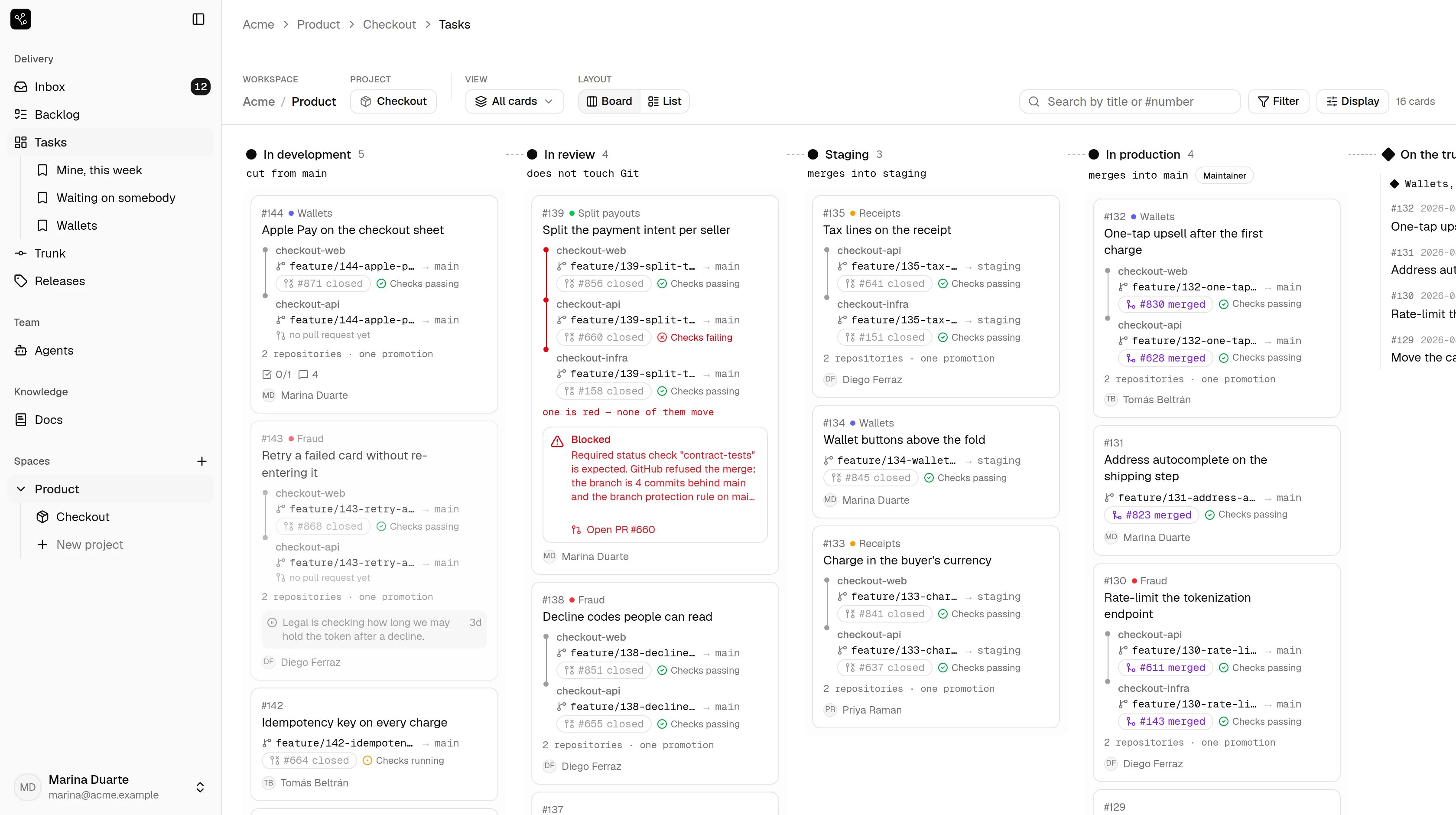
 Work in flight. The backlog is a list of its own and is not here.
## The line under each column
Look at the grey line under the column names: **cut from main**, *does not
touch Git*, **merges into staging**, **merges into main**. That is the flow's
branch rule for that stage, written where you are about to drop a card.
It is the whole difference between this and a board with a Git integration.
Dragging a card into **In production** is not a label change that something
else reacts to — it is the merge into `main`, and the column says so before
you do it.
`Maintainer` beside a column is the minimum role to move a card **into** it.
Promoting to production is not the same permission as starting work.
## What a card shows without being opened
Each card carries every repository it touches, and for each one the branch,
the pull request and what CI said:
```
checkout-web feature/144-apple-p… → main #871 closed Checks passing
checkout-api feature/144-apple-p… → main no pull request yet
2 repositories · one promotion
```
"2 repositories · one promotion" is the lockstep promise on the card face: a
feature touching the web app and the API is **one delivery**, and moving it
moves both or neither.
## Filtering and views
**Filter** narrows what is on screen; **Display** changes what each card shows.
An arrangement worth keeping becomes a saved view — *Mine, this week*,
*Waiting on somebody*, *Wallets* in the sidebar are those.
Views are personal. Yours are yours.
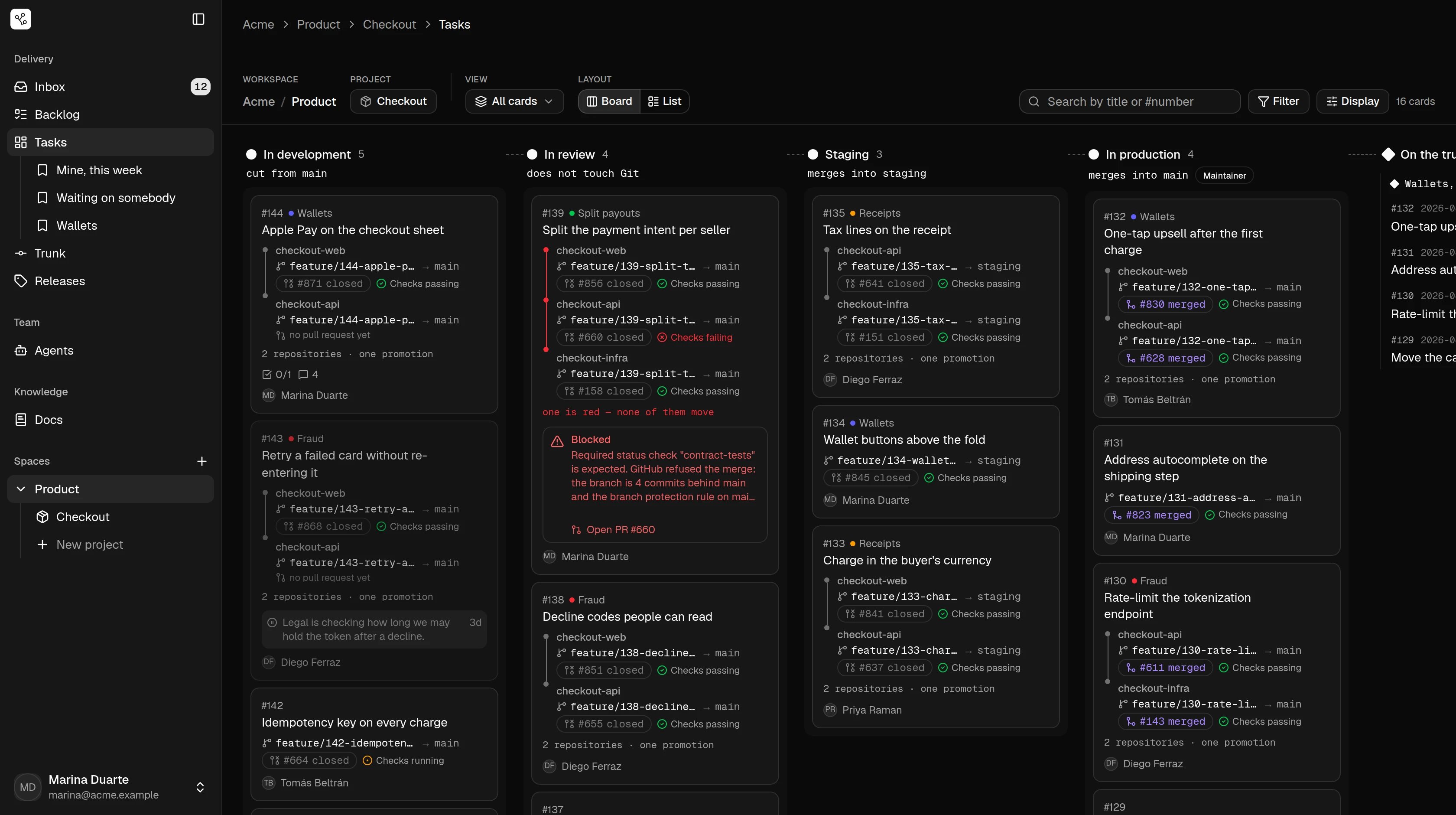
Work in flight. The backlog is a list of its own and is not here.
## The line under each column
Look at the grey line under the column names: **cut from main**, *does not
touch Git*, **merges into staging**, **merges into main**. That is the flow's
branch rule for that stage, written where you are about to drop a card.
It is the whole difference between this and a board with a Git integration.
Dragging a card into **In production** is not a label change that something
else reacts to — it is the merge into `main`, and the column says so before
you do it.
`Maintainer` beside a column is the minimum role to move a card **into** it.
Promoting to production is not the same permission as starting work.
## What a card shows without being opened
Each card carries every repository it touches, and for each one the branch,
the pull request and what CI said:
```
checkout-web feature/144-apple-p… → main #871 closed Checks passing
checkout-api feature/144-apple-p… → main no pull request yet
2 repositories · one promotion
```
"2 repositories · one promotion" is the lockstep promise on the card face: a
feature touching the web app and the API is **one delivery**, and moving it
moves both or neither.
## Filtering and views
**Filter** narrows what is on screen; **Display** changes what each card shows.
An arrangement worth keeping becomes a saved view — *Mine, this week*,
*Waiting on somebody*, *Wallets* in the sidebar are those.
Views are personal. Yours are yours.